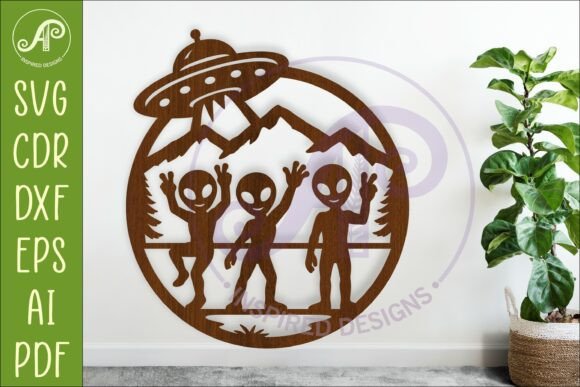
Alien Wall Art UFO Sign Laser Cut File
Ready to add a touch of cosmic intrigue to your next creative project? This Alien Wall Art UFO Sign Laser Cut File is a versatile digital download designed for crafters and makers who want to create striking, otherworldly decorations with precision and ease. Perfect for laser cutters, CNC routers, and various craft machines, this design brings a unique, handmade aesthetic to your workshop.
This digital download provides everything you need to start creating immediately. The design is saved in multiple formats including SVG, DXF, AI, filled SVG, PDF, and CDR, ensuring compatibility with most software and hardware. The recommended cutting size is between 20 to 50cm wide, with the file saved at a 25cm (10-inch) base size for easy scaling to fit your specific project needs.
Think of this laser cut file as a foundational design asset for your creative toolkit. Its value lies in its flexibility. You could use it to produce a single, eye-catching piece of wall art for a home office or game room, or scale it up to create a bold sign for a themed event or business storefront. The clean, defined lines make it ideal for cutting from wood, acrylic, metal, or even cardstock.
Practical Applications for Your UFO Design
The true appeal of this file is how it can be adapted across different projects. Here are a few practical ways you might use it:
- Home Decor & Wall Art: Create a standout piece for a sci-fi enthusiast's room, a modern living space, or a child's bedroom. The design cuts into a fantastic dimensional sign.
- Event & Party Decorations: Craft unique centerpieces, props, or signage for a UFO-themed party, Halloween display, or convention booth.
- Custom Merchandise: Use the cut shape as a stencil or a direct cut piece for personalized gifts, keychains, or ornaments.
- Business Signage: For niche businesses like escape rooms, comic shops, or themed cafes, this design can become a memorable part of your interior branding.
When working with any new design asset, it's wise to consider a few things. First, always do a small test cut with your chosen material to check for clean lines and detail accuracy. Second, think about the final presentation. Will you paint it, stain it, or leave the material natural? The finish can dramatically change the final look from rustic to sleek and modern.
Tips for a Polished Final Product
Achieving a professional result comes down to preparation. Before you cut, double-check that your machine's settings are calibrated for your material's thickness. The design's blue exterior cut lines are formatted for easy software recognition, simplifying the setup process. Consider the layering; while this is a single-layer design, you could cut multiple copies and stack them for added depth and shadow effects.
Choosing a well-crafted digital file like this one ensures a smooth workflow from screen to physical object. It eliminates the guesswork of creating a complex design from scratch, saving you valuable time and allowing you to focus on the craftsmanship of the cutting and finishing process. Whether you're a hobbyist looking for a fun weekend project or a professional maker expanding your product line, a reliable and versatile design file is a cornerstone of efficient and creative production.